MangaKu: Read Comics & Manga
- 0.0
- Rating
- 50.00K
- Installs
- Free
- Price

 Analysis by App-foxy
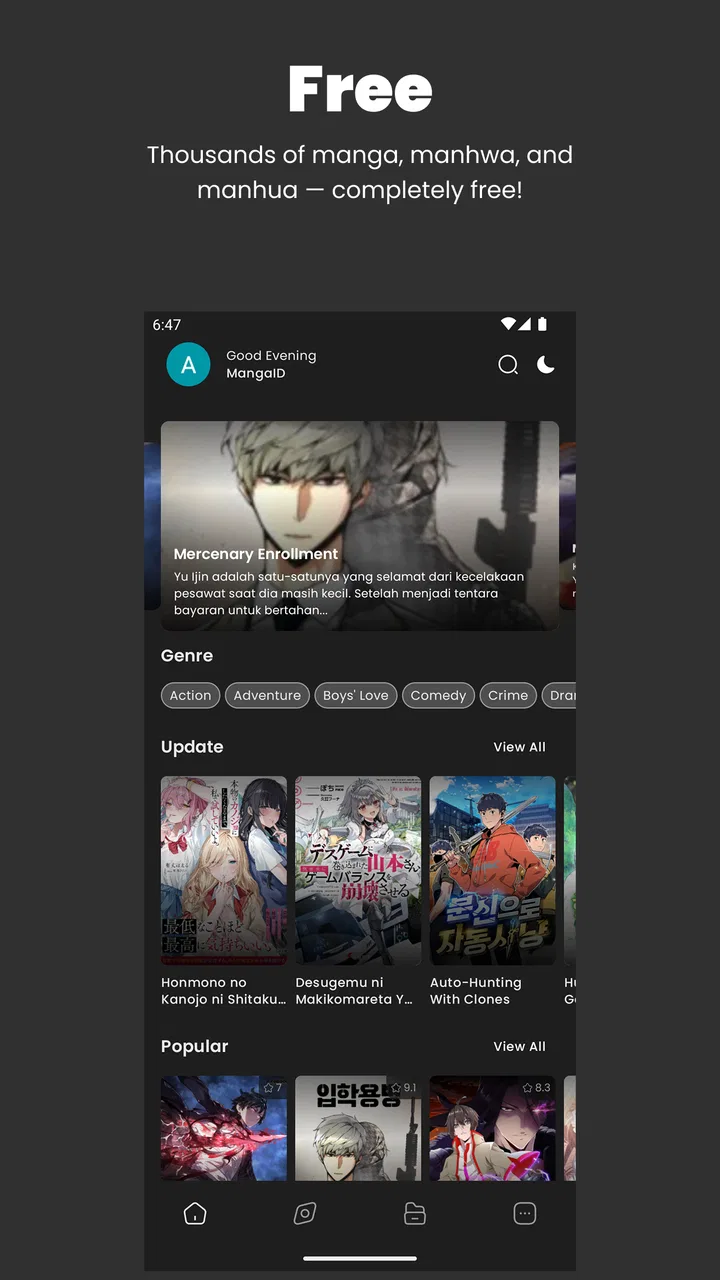
I tried MangaKu: Read Comics & Manga as a lightweight comics app rather than treating it like a full replacement for every established manga reader. That distinction matters. Its appeal is immediate: it is free, aimed at Teen readers, and built around getting into a chapter without making the surrounding interface feel heavy. The experience is most convincing when I have a reliable connection and want to read casually, especially during short breaks when I do not want to manage a complicated library.
At the same time, this is an app where the quality of the connection becomes part of the reading experience. Pages, catalog browsing, and daily content depend on how well the app can communicate with its service. I would not choose it simply because a store summary promises convenience; I would choose it if my reading habits fit a quick, connected workflow and I am comfortable with a relatively focused feature set.
How MangaKu feels when reading depends on the network
The most noticeable strength is the low-friction approach. MangaKu is categorized under Comics and comes from Wahidev, with the store positioning it around free comic and manga reading, regular additions, and a comfortable interface. In practice, that combination makes sense for readers who want to open the app, find something interesting, and start reading without first configuring several layers of personalization.
You May Also Like

 Blood Strike: 2.5 Anniversary
Blood Strike’s Loadouts Turn Every Drop Into a Tactical Gamble
A close look at Blood Strike’s custom loadouts: how fast access to signature weapons reshapes its battle royale rhythm, rewards preparation, and narrows the gap between fights.

 Pandora - Music & Podcasts
Pandora’s Music Is Easy to Start, but Harder to Recover
Pandora’s strength is its low-effort path from a seed to a station. Its weak spot is how much confidence it asks you to place in connection, setup, and quiet recovery.

 8 Ball Pool
 Is Built on Rivalries, Rematches, and Routine
A close look at the rivalries, rematches, shared routines, and unanswered safety questions that turn a quick pool match into a persistent mobile community.

 Samsung Music
’s Quiet Strength Is Playing What You Already Own
Its reach comes less from spectacle than from dependable access to a personal library. That simplicity is both the app’s strongest retention engine and its ceiling.

 AccuWeather: Weather Radar
AccuWeather Review: A Quick, Clear Forecast for Everyday Decisions
For everyday plans, the best forecast is the one you can understand quickly. AccuWeather makes rain timing, radar, and local conditions easy to act on, with a few trade-offs.

 Hill Climb Racing
Why Hill Climb Racing Still Turns Crashes Into One More Run
A tiny car, a bumpy hill and one more upgrade: Hill Climb Racing keeps resurfacing because its simple chaos makes every near-miss feel personal.
More From Our News Desk



That simplicity also means connectivity is not a background detail. When the connection is behaving well, moving from discovery to a chapter feels natural. A weak or unstable signal changes the rhythm: browsing can take longer, images may not appear as quickly as expected, and the pause between tapping and reading becomes more obvious. I found that the app is best approached as a connected reader rather than as a guaranteed travel companion.
This is important for anyone comparing it with a mature manga platform. Larger alternatives often make their reading systems feel more predictable because they may offer clearer library management, synchronization, or more established download workflows. MangaKu’s attraction is different. It is the lighter option to try when I want free access and a straightforward interface, not necessarily the most complete ecosystem for a long-term collection.
Daily reading works best with a simple routine
The promise of daily updates is useful for readers who like checking for something new instead of following only one carefully organized series. I would treat that feature as a reason to return, not as a guarantee that every visit will produce a perfect recommendation. A practical routine is to browse when connected to a stable network, choose a chapter, and avoid repeatedly jumping between many titles if the signal is inconsistent.
That small change in behavior makes the app feel more responsive. It also prevents a common frustration: tapping around quickly while pages are still being requested. On a phone, impatient navigation can make it harder to tell whether a chapter is loading, whether a page needs another moment, or whether the connection has briefly failed.
For a reader who enjoys discovery, this connected model can be pleasant. For somebody who already knows exactly which series they want and expects a polished, searchable archive every time, the experience may feel less convincing than a dedicated service with a deeper account and library system.
Short mobile sessions are where the lightweight design helps
I found the format most useful in ordinary mobile situations: reading a few pages while waiting, continuing a chapter during a lunch break, or checking new material before going to bed. The lightweight interface does not compete too much with the page itself, which is valuable on a smaller screen. It feels more suitable for spontaneous reading than for building an elaborate reading dashboard.
There is also a practical advantage to keeping the session narrow. If I open the app with one title in mind and stay within that chapter, the phone remains a reading device rather than turning into a catalog-management project. This is one of the less obvious strengths of MangaKu: its simplicity can encourage actual reading instead of endless sorting.
However, the same simplicity may disappoint users who want many controls. Readers accustomed to extensive display settings, advanced tracking, detailed filters, or a highly structured personal library should test the workflow before making it their main reader. A clean interface is not automatically a complete interface.
A realistic commute scenario
Imagine I am leaving home with a chapter open in mind and expect to continue it on a bus. If the connection remains steady, MangaKu can fit that plan well: I can open the app, locate the reading material, and continue without carrying a separate physical volume. But if the route passes through weak coverage, I would not assume the next page or chapter will be ready simply because the previous one displayed correctly.
That is the key planning lesson. I would check the chapter while still connected rather than waiting until the weakest part of the journey. I would also avoid treating the app as a substitute for a confirmed offline library. The available information presents MangaKu as a connected reading app, so I would make travel decisions around that reality instead of expecting offline behavior that has not been established.
For a short commute with dependable service, this may be enough. For a long flight, rural trip, or underground journey where reading must continue without a network, I would favor a reader whose offline workflow is explicitly documented and central to its design.
What happens when a page or catalog request fails
Connectivity problems are not always dramatic. Sometimes the catalog opens but a cover takes longer to appear. Sometimes a chapter begins and the next page hesitates. In those moments, the best recovery approach is deliberately boring: stop tapping repeatedly, give the current request a moment, then return to the previous screen and try again only after the connection has stabilized.
This matters because repeated taps can make a mobile reader feel more broken than it is. A lightweight app gives fewer visual clues than a large platform with extensive loading states, so patience becomes part of the workflow. I would also close and reopen the reading session if navigation becomes confused, rather than continuing to press controls rapidly.
I would not judge the entire app from one failed request, because a temporary network interruption can affect any online reader. The fair criticism is that a connection-sensitive experience requires the user to manage expectations. MangaKu is more comfortable when I accept that reading continuity may depend on the current network instead of assuming every chapter transition will be instant.
Recovering without losing the reading mood
For me, the most useful recovery habit is to remember the title and chapter position before leaving a stalled screen. That sounds obvious, but it reduces frustration when I need to restart the app or revisit the catalog. On a casual reader, preserving the mental bookmark can be more important than having a long list of technical controls.
If I am reading at home, I would retry on the stronger connection rather than spending time troubleshooting the phone. If the issue happens only in one location, I would treat it as a context problem first. If it happens repeatedly across different networks, that would be a reason to compare MangaKu with another service before relying on it for a regular reading schedule.
This is also where the app’s free price changes the decision. Because there is no purchase barrier, trying it in the places where I normally read is sensible. I can see whether its connected flow suits me before moving my reading habits away from another platform. Free access lowers the cost of experimentation, but it does not remove the cost of interruptions.
Using it carefully when mobile data matters
Comic pages are visual content, so readers who have limited mobile data should approach any connected manga app thoughtfully. I would begin by using MangaKu on Wi-Fi for catalog browsing and longer reading sessions, then observe how comfortable the app is on mobile data before making it part of a daily routine. This is not about assuming a particular data policy; it is simply a sensible way to control what the phone is asked to load.
A useful habit is to avoid repeatedly opening and abandoning the same chapter while deciding what to read. Choose the title first, then settle into one session. That reduces unnecessary browsing and makes the connection work feel more intentional. I would also avoid leaving the app open in the background as a substitute for a saved reading plan, since the available product details do not establish how content is retained for later use.
Readers on generous home Wi-Fi may never notice this consideration. Someone using a restricted plan, sharing a hotspot, or reading in areas with expensive data will care much more. For that audience, the app should be evaluated not only by how comfortable the pages look, but by whether its connected behavior fits the person’s monthly habits.
Who will enjoy the focused approach
MangaKu makes the most sense for someone who wants a free way to read comics and manga on a phone, appreciates a lightweight interface, and usually has reliable connectivity. It is particularly approachable for casual readers who do not need a large amount of setup before starting. The Teen content rating also gives families and younger readers a clear age-context signal, although I would still make individual choices based on the actual titles being read.
It can also suit a reader who likes returning for fresh material rather than maintaining a carefully curated archive. The daily-update angle gives the app a reason to revisit, while the simple design keeps that check-in from feeling like an administrative task.
I would be more cautious about recommending it as the only reader for a serious collector. If your priorities are dependable offline access, deep organization, highly specific discovery tools, or a mature cross-device reading history, another service may be a better fit. MangaKu’s strength is immediacy, not a promise of an all-purpose reading system.
How the current release affects my recommendation
The app was released on April 8, 2024, and the current version is 2.0.5. I mention that because a relatively recent app can still be developing its identity. My reaction is not to expect the same depth as a platform that has spent years refining every library and synchronization detail. Instead, I look at whether the current experience already handles its main job: helping me read manga and comics without unnecessary weight.
On that narrower mission, the app has a clear personality. It does not need to overwhelm a new reader with options to be useful. But a focused product also has less room to hide weaknesses. Any hesitation in loading, any uncertainty around continuing a chapter, and any missing organizational convenience is more visible because the reading path is so direct.
The average rating shown for the app is 0.0, while its reach is listed at over fifty thousand installs. I would not use either figure alone to decide whether it belongs on my phone. The install count suggests that people are trying it, but the rating does not give me a reassuring quality signal. That makes hands-on testing especially important: I would judge it by a few real reading sessions on my own networks rather than by assuming popularity equals reliability.
Questions I would answer before installing
Is it free to try? Yes, MangaKu is listed as free, which makes it easy to test without committing money. I would still evaluate it against my reading needs, because a free app can be unsuitable if interruptions or limited organization make it inconvenient.
Can it be used comfortably on an older phone? The minimum operating system is Android 8.0, and the app is presented as lightweight. That suggests it is worth considering for users who do not have the newest device, although the actual comfort of reading will still depend on the phone’s screen, connection, and general performance.
Is it appropriate for every child? The content rating is Teen, so I would not treat it as a children’s-only reader. Parents should consider the individual comics and the reading context rather than relying on the app category alone.
Does it replace a dedicated offline reader? I would not make that assumption. Its strongest case is connected reading, and anyone who needs guaranteed access away from a network should choose a service that clearly centers offline availability.
Should an existing manga enthusiast switch immediately? Probably not. I would install it alongside the usual reader, test discovery and chapter continuity, and compare how often the network interrupts me. If the lightweight flow is what I value most, it may become a convenient secondary option; if library depth matters more, the established alternative may remain the better home.
My connectivity verdict
After looking at MangaKu through the situations that usually expose a mobile reader’s weaknesses, I see a useful but deliberately narrow proposition. It is a free Comics app from Wahidev with a lightweight feel, a Teen audience label, and a reading flow that is most enjoyable when the network is stable. Its daily-update focus gives me a reason to return, while its simple presentation makes short sessions easy to start.
The trade-off is that I would plan around connectivity. I would browse and read on a dependable network, be careful with mobile data, and avoid promising myself uninterrupted travel reading unless the app’s offline behavior is explicitly established. That is not a deal-breaker for home readers or casual commuters, but it is a serious consideration for anyone whose reading happens in unreliable coverage.
My recommendation is to try MangaKu as a lightweight connected manga reader, not as an automatic replacement for a full-featured library. If you want free access, quick sessions, and a clean path from opening the app to reading, it is worth a test. If your ideal reader must preserve chapters for offline trips, organize a large collection, and provide a highly developed long-term ecosystem, I would keep looking. The app succeeds when its modest scope matches your habits; it becomes frustrating only when you ask it to solve a bigger reading problem than it is designed to handle.
FAQs for MangaKu: Read Comics & Manga
01Is MangaKu available for both Android and iOS devices?
Yes, MangaKu is available for download on both Android and iOS platforms. Users can easily find the app on the Google Play Store for Android devices and the App Store for iOS devices. This allows manga enthusiasts to enjoy their favorite comics on a wide range of smartphones and tablets.
02Does MangaKu offer offline reading options?
MangaKu provides an offline reading feature, which allows users to download their favorite manga and comics to their devices. This is particularly useful for those who want to enjoy reading without an internet connection, such as while traveling or in areas with limited connectivity.
03Are there any subscription fees required to use MangaKu?
MangaKu offers both free and premium versions. While the free version includes access to a large library of manga, the premium version provides additional benefits such as ad-free reading, early access to new releases, and exclusive content. Users can choose the plan that best fits their preferences and budget.
04How frequently is new content added to MangaKu?
MangaKu regularly updates its library with new manga chapters and comics. The frequency of updates depends on the publishers and creators, but users can typically expect new content to be added weekly. This ensures a fresh and engaging reading experience for avid manga fans.
05What kind of genres and categories can I find on MangaKu?
MangaKu offers a diverse range of genres and categories, catering to various tastes and preferences. Users can explore action, romance, fantasy, horror, comedy, and many more. The app's extensive library ensures that there is something for everyone, whether you're a fan of classic series or new releases.
Pros
- Extensive library of popular manga and comics.
- User-friendly interface for easy navigation.
- Offline reading mode for convenience.
- Regular updates with the latest chapters.
- Customizable reading settings for comfort.
Cons
- Contains ads that can interrupt reading.
- Limited language options available.
- Requires internet for initial downloads.
- Occasional loading delays in the app.
- No option for downloading entire series.

MangaKu: Read Comics & Manga
Gallery